 OpenKalea™Working to make intelligence
both private & ambient.
You don't need any of this to love Kalea — she is warm and simple on purpose. Under that surface is a sophisticated system, and if you like to see how things really work, this page is for you.
One click from the surface. Stay as long as you like. Swim back up whenever.
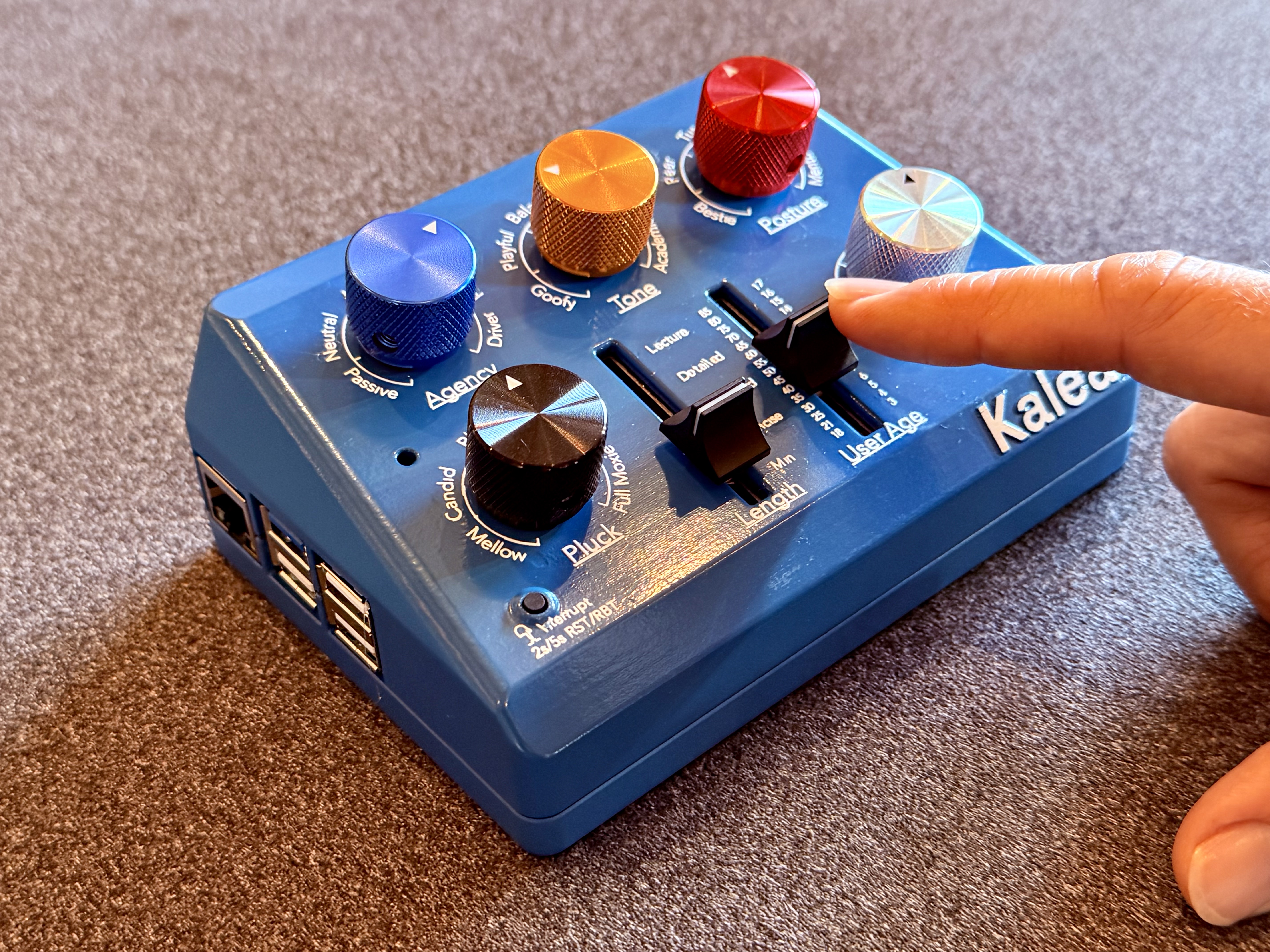

Kalea is one intelligence. Like an octopus, she has a central brain and capability distributed through her many arms — voice, the Personality Deck, dreams & memory, off-line messaging and control, multi-model optimization. Everything below hangs off this single structure.
Kalea meets you through voice, knobs, and off-grid messaging → thinks locally → changes shape dynamically → expresses that shape as tutoring, companionship, private intelligence, or bounded agency → remembers, dreams, protects, delivers.
Most AI is configured through prompt text. Kalea's behavior is set by touch: a set of knobs and sliders. Each knob's position is converted into an analog-to-digital signal — so the feel is continuous, like a musical instrument, not a menu. This is Analog Prompting™ — patent pending. The knobs are colored and the stops are words — Bestie to Mentor, Goofy to Academic — so the panel reads like a person, not a spec sheet.
Changes take effect live, with no restart. Kalea speaks changes aloud ("I'll be Playful").
Try it — watch the prompt rebuild →Turn the knobs — click, drag, scroll, or use the arrow keys.
Kalea hears and speaks entirely on-device, in a loop tuned to feel like conversation, not commands.
Wakes on "Kalea", holds explicit awake/asleep states, auto-sleeps after silence, and filters stray post-wake chatter so noise isn't treated as a question. Gentle wake, sleep, and acknowledgement sounds — and, while she ponders, a spoken “let me think about that” followed by a quiet water texture.
On-device speech recognition with voice-activity detection tuned separately for awake, asleep, onboarding, and barge-in. Pre-roll capture means your first words are never clipped.
On-device speech in five voices — Coral, Tide, Firth, Harbor, and Keel — each user keeping their own. Streamed for clarity and phrased for the ear — no "look at this chart," just spoken explanation. Hear them →
Interrupt her any time. Foreground human activity outranks long replies, background inference, and proactive behavior. She yields rather than finishing at all costs.
A new speaker is asked her name before becoming a real user — age is never asked; it comes from the Age slider — separating guest behavior from named-user memory.
Teaching by ear forces a useful discipline: explain through story, analogy, and mental imagery. Socrates didn't have a dashboard.
Off-grid messaging is encrypted text control over a Bluetooth Low Energy (BLE) mesh. From a nearby phone, with no internet and no cloud account, you can pair to Kalea and drive her entire configuration through a simple menu tree.
Download the Bitchat app. Kalea is the BLE client: her bootstrap listener scans for your phone's Bitchat off-grid messaging service and connects over GATT — there's no operating-system Bluetooth pairing dialog. Open the Bitchat app, and Kalea finds you. Access is gated by a local 4-digit PIN; send it alone or with a username in one message.
Sent automatically right after you authenticate. Pick a letter; cmd still works as a direct shortcut.
Underneath the warm voice, Kalea is a full Ubuntu Desktop OS. Connect an HDMI monitor and a USB keyboard and mouse and you get an ordinary computer — no app, no portal, no account. The things you give Kalea live as plain folders on that desktop.
Want Kalea to become a companion for a grandparent? Drop a folder of photos, letters, and stories into Family History. Homeschooling? Drop your curriculum into Lesson Plan. Want her to teach through what a kid loves? Drop it into the Interests folder. She ingests new material locally, while idle — incrementally, so she only reads what changed.
Because it's a real desktop, those files literally sit on the machine in your house. Nothing uploads, nothing syncs to a server. You can see the privacy policy in your own file manager.
~/Desktop/Kalea/Family History — stories, photos, docs, recipes~/Desktop/Kalea/Interests — a folder (with a plain-text seed file inside) — the household's loves~/Desktop/Kalea/Lesson Plan — parent/teacher curriculum~/Desktop/Kalea/Notes — short guidance she keeps in mind, always or when a topic comes up (a README in the folder explains the headers)~/Desktop/Kalea/exports/ — your conversation history, as Markdown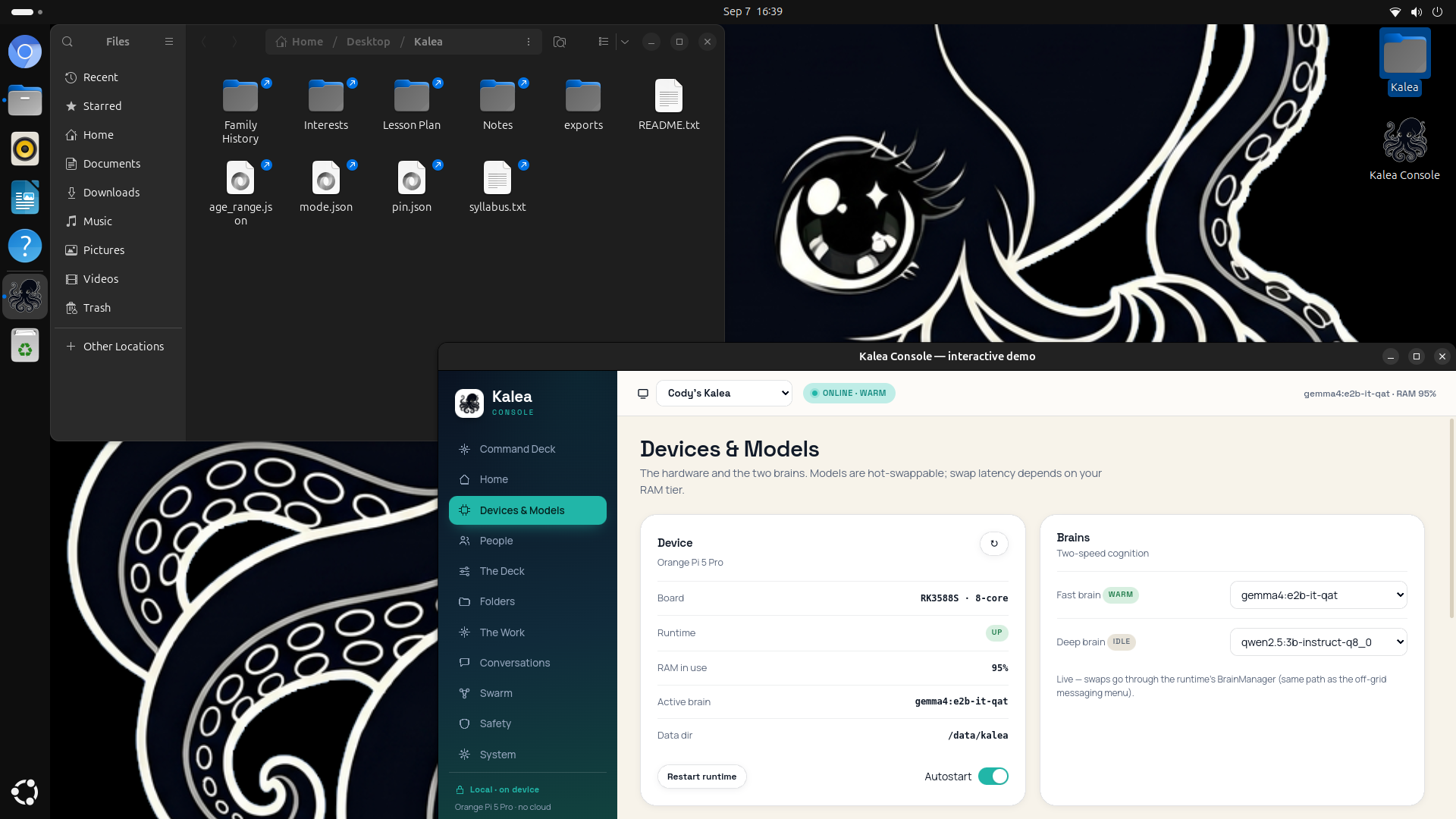
The Kalea desktop, as it ships: the Kalea folder open in Files, the Console running, her wallpaper behind.
No special software to learn. If you can drag a file into a folder, you can teach Kalea — and you can always see exactly what she has.
The Console is the one local app that is the complete control plane for a Kalea, or a whole household of them.
Below is the Console that lives on every Kalea — shown here with demonstration data so you can click through it. There's no device to reach, so this simply shows a demo household. Start on the Command Deck — type to her, play one of her dreams, preview the five voices under The Deck — then explore the modules in the left rail, open the Swarm graph, and click around the interface.
An occasional guardian surface, opened when needed — not an always-on screen. Kalea remains voice-first; the Console is the operator's window, not the permanent interface.
Kalea thinks on-device with two-speed cognition and an optional council of models — and on Kalea Pro, more memory makes it fast.
A low-latency fast brain handles ordinary conversation (and acts as judge in multi-model work); a heavier deep brain handles richer reasoning, switched on deliberately by voice or from the Console. On Kalea Pro (16GB) both stay warm at once, so switching costs no reload. On Kalea (8GB) one model is warm at a time, so the deep-brain switch takes about 45 seconds.
Assign 2–4 local models to slots A–D; the same prompt runs across them; the fast brain judges which answer deserves to speak and returns the winner, annotated by slot. Different small models fail differently — the best model is a per-question event. The Council costs a full turn per candidate, so it lives in the text lanes; voice, verbal and file modes bypass it to keep conversation on one model.
Every turn, one bounded local prompt is assembled from many sources and budgeted to fit — so context is rich without blowing latency.
The system prompt and model runner are warmed and verified before Kalea reports ready, so the first real turn never feels broken. Models stay resident while running; a watchdog re-warms if one is evicted. A unified runner shape prevents warming one model while real turns hit another.
See the developer architecture →Kalea has no "modes." Her behavior emerges from two axes plus an always-on floor — so a tutor, a companion, a coach, and a private second mind are all the same intelligence under different settings.
A primary fork. Under-18 = protected, age-graded, interests as seasoning. Adult = open, interests become the curriculum as the knob climbs.
The primary dynamic control. Low (bestie/peer) = present-with-you; middle (tutor) = learning-forward; high (coach/mentor) = teaching, challenge, synthesis.
Shape emerges from what you give her. A Family History folder turns on companion behavior at low posture; an Interests folder drives interest-learning; a Lesson Plan folder lets parents steer.
Family · History · Syllabus · Interests — blended dynamically by age gate and posture, each pool gating on whether its folder is present and renormalizing. Under-18 leans on syllabus as posture rises; adults lean on interests.
Rules that never move: don't confabulate family facts, don't claim memory that isn't there, don't regurgitate scaffolding, handle grief gently, roll with repetition, address the listener by name, prefer warm correction over refusal, stay audio-native.
Kalea is present through layered local memory, and she keeps working by dreaming while you're away.
Named users with per-user folders, history, safety, and age gate — a household isn't one shared mind.
Recent chat for continuity, fuller episodes retained beyond the window, cleaned and compressed so memory stays useful, not noisy.
Distilled objects — dream reflections, lesson notes, compendium entries, interest synthesis, learned facts — scored, selected for relevance, retention-bounded.
Human-supplied always-on or match-triggered guidance; tracked topics, review queues, and open loops for spaced follow-up.
While idle (and guarded by sound detection so she never competes with you), Kalea dreams: she reflects over syllabus, history, family, interests, and prior lessons, producing small reusable insights and gentle openings for next time. The compendium turns raw history into structured continuity.
"Yesterday you wondered why submarines don't get crushed. Want to try a pressure experiment in your head?" Memory becomes invitation.
Paced by the Agency knob — silent at Passive, frequent at Driver — under quiet hours and a daily cap. Lesson follow-ups, review prompts, interest connections, family memories, a quiet "want to keep going?" Human activity always wins; background work stops the moment you speak.
Most AI agents are a general model handed permissions to go off and do tasks. Kalea's agency is narrower on purpose. The agents are the Kaleas themselves, each bound to a role: a child's tutor, an elder's companion, a thought-partner. Their agentic actions are the work of those roles — teaching, keeping a mind conversationally present, thinking alongside you. A Kalea is an agent not because it runs errands but because it acts on its own within a bounded role and emits synthesized output — a consolidated compendium account — to the nodes allowed to receive it.
Each Kalea is bound to its role locally; the work of that role is the agentic action.
While idle, the node consolidates interactions into a compendium — a summary, never a transcript.
The graph director decides what may leave the node, and at what fidelity.
The consolidated output flows as-directed across the graph — the agentic product, governed.
Establishes and curates the graph: which hardware relates to which, and how.
Concretely: Maya's tutor teaches Maya (role), reflects on the week while idle (synthesis), and — because the parent drew exactly one edge for it — emits "fractions practicing; mood improved after a win" upward to Mom's node (permissioned emission). The transcript never moves. The agentic output is the consolidation; the director decided the relationship that lets it flow.
A home contains children, parents, elders, guests, private histories, jokes, grief, homework, and the dense sacred mess of ordinary life — people who love each other and still don't have equal rights to know everything about each other. A Kalea swarm is therefore a household intelligence with a permission graph: a set of local companions, each sealed to its role, exchanging only the synthesized signals they are explicitly allowed to share.
Each Kalea is a node with a role — a child's tutor, an elder's companion, a parent's thought-partner, a director that synthesizes across nodes, a broker that may touch the outside world. Each connection is an edge: directional, typed, permissioned, fidelity-bounded. A tutor may send a weekly learning summary up to a parent; the parent's node may send nothing back. Symmetry is never assumed.
Sharing is never "forward the data." Raw content — a transcript, a journal-like artifact, a family history file, a dream — stays on the node where it was born. What moves is a representation, emitted at the lowest fidelity the receiving edge allows. The fidelity ladder is also the privacy ladder:
A sealed child tutor shouldn't have to be ignorant to be safe. When a question needs the outside world, the node asks the broker — the single visible, governed door with the uplink. It fetches, verifies, and returns a bounded summary; the child's node remains offline by construction. (This feature is still getting dialed-in) The strongest privacy guarantee is an absence: this node has no internet path, and cannot leak through a channel it does not possess.
The director turns allowed signals into a family digest and coordinates a small, kind, well-timed nudge across the home. It can know that fractions are hard this week and the homework rhythm has been rough — without ingesting anyone's raw private life. A distributed Small Council also lives here: one node broadcasts a bounded question, reachable peers return short candidates, the judge picks the best. Same local-first principle, better latency, no cloud requirement.
The home gets smarter without becoming a panopticon. One household intelligence, made of sealed companions, visible permissions, narrow pipes, local memory, and human hands on the controls.
Build on the Agentic Graph — for developers →Safety here is age-aware and runs on-device, without surveillance cloud services. It supports the promise of a high-trust private intelligence rather than fencing it off.
Pre-LLM intercepts run before the model: self-harm redirect, sexual-content handling, abuse-disclosure escalation, cussing rephrase. Per-user intercept logs stay local (parents can review interaction logs).
A self-harm / suicide intercept with an agency-respecting 988 redirect; other adult topics generally pass through to preserve the private-intelligence ethos.
Validators reject fabricated-contact and first-person-family patterns, and keep learning memory from inventing progress. Known facts vs. inference stay distinct.
We describe safety features factually; they're never a substitute for human care or crisis services, and a young child can't fact-check — so Kalea is a learning companion with a parent in the loop, not an unsupervised authority.
The pre-model intercept in depth, the protected categories and crisis responses, how we adversarially test her, real exchanges from testing, and exactly where the lines fall between under-18 and adult.
Kalea end to end — the physical platform she runs on, and the software architecture that runs on it. Expand any branch.
cmd shortcut still works): A · CMD, B · Custom, C · Agentic, D · Stop~/Desktop/Family History), Lesson Plan (~/Desktop/Kalea/Lesson Plan), Interests (an editable text file), Exports (~/Desktop/Kalea/exports, Markdown)Going deep is hard work! What's next for you?